BLOGGED
§ Recent Comments
- Jeffrey: lol! maybe he/she couldnt afford
- Lorna Dietz: Hello, darling Lauren! It is
- aline: that's some rainfall! That guy
- Lee: Your rebuttal is excellent and
- certron: Wow, I've never had that
§ Recent Posts
§ Stalkers
Community announcements and web resources now at the web portal. Visit the Protagonist' Affordable and Reliable WebHosting Plans for your webhosting needs.
Saturday, November 16, 2002
Trojan Horse Music Search
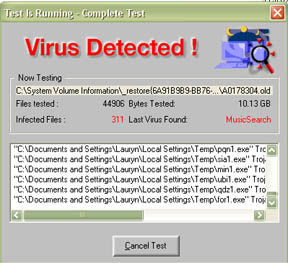
Yikes! Using my AVG anti-virus program, it detected 311 Trojan Horse MusicSearch Virus? Wonder where I got it!
 doodled by lauryn
  @ 08:23 pm
Info site for Trojan Horse Music Virus
Anti Trojan and the Trojan Horse MusicSearch Virus
182 Comments »
The URI to TrackBack this entry is: http://blogged.the-protagonist.net/wp-trackback.php/1530
RSS feed for comments on this post.
Leave a comment
Line and paragraph breaks automatic, e-mail address never displayed, HTML allowed: <a href="" title="" rel=""> <abbr title=""> <acronym title=""> <b> <blockquote cite=""> <code> <em> <i> <strike> <strong>
Info site for Trojan Horse Music Virus
Anti Trojan and the Trojan Horse MusicSearch Virus

hmmm…. how are you finding your music? Back up your hard drive as often as you can…. remember what happened to me? *cries*
i got it twice at some serial site so i went back just to double check and sure enough my trial avg poped back up.avg delited it each time .it was in my c:/windows/temporary internet files/content.ie5. Trojan horse MusicSearch was from www.deluxserials.com nice site a shame about the viruses

Dean -- Friday, October 10, 2003 @ 03:36 am Reply
Hi!!
Can you please tell me how you removed them!! I have the same problem but cant remove them!!
I just did a scan using the AVG it detected the trojan horse musicsearch virus…… could someone please tell me how to get rid of these viruses. your help would be greatly appreciated. :frog:
Jeanne -- Saturday, August 23, 2003 @ 04:58 am Reply
I had it too…but AVG seems to have gotten rid of it…
The first time I got a warning about this virus, i had just dowloaded & installed MSNPlus from a friend and upon opening it AVG threw up a warning \"virus detected\” thingy
I got rid of the MSNplus program and ran ANG again…no viruses found. So I went to a different more trustworthy site and downloaded MSNplus again.
As soon as I opened the installer wizord, AVG flipped out again with the same warning.
CrashnBurn -- Sunday, October 05, 2003 @ 04:05 pm Reply
I\’ve got JUST THE SAME Problem as You.

 !
!
I think the virus came from this (Music) Site: http://www.mp3mediaworld.com
I\’ve got also AVG but it can\’t remove the \"Virus Trojan Horse MusicSearch\"… for the moment…..
Who knows the solution fot this problem ?
MANY THX ! ! ! ! !
I just found it on my computer also, I did a search on Google and it`s the only site which mentions the musicsearch. It must be new. I also have AVG, I will try another anti virus.
I was able to remove the problem file by doing the following:
(1) rename the offending file (named ienllshsslx.dll on my system) by changing the .dll to something else (like .die);
(2) reboot your system;
(3) rerun AVG scanner, which will then automagically heal the infection.
I\’d like to know the mechanism of infection if anyone knows…
I\’ve found out from a technician that this Trojan Horse MusicSearch virus is originated from the Kazaa program. Thus, immense precaution must be taken when using this program.
Jerry -- Saturday, August 30, 2003 @ 08:45 am Reply
ugh it still shows up on my computer. Running anti norton doesn\’t even detect the virus
Call me a sceptic… I have norton 2003 pro and have also got avg and avg keeps finding this music search but norton has no record of it…has anyone thought that this may be a problem with AVG (a free software) and not actually a virous as the difference between a trojan and a real file are very very slim :duh:
Chris Monks -- Sunday, October 19, 2003 @ 05:28 pm Reply
Same problem but a different name. I found the virus and it wouldn\’t delete or vault it. I rebooted the machine, it found it and then deleted it. This only happened after I downloaded the latest update on 24th Nov
If you have this virus, and you are using AVG just restart your machine to DOS, then go to you avg directory, and run avg. It will scan and safely remove all the files. But I still dont know how it get to my computer
how do i get rid of this trogan worm virus
robert -- Thursday, February 26, 2004 @ 02:50 am Reply
I know how to remove it. If your AVG antivirus still picks it up stop the program because it will only heal it then go back to your antivirus vault and delete it there do not heal it it won\’t remove it. I just came here for information on this and did a search and this site came up so since you guys are having problems I thought I would tell you how to remove it.
McAfee also doesn\’t recognize the virus! It\’s quite new and perhaps it\’s a virus produced by the music industry to bring down the numbers of downloads. Instead they should cheapen the price of CD\’s!!
Thanks for the onformation how to get rid of the virus, I will try it tonight when I\’m home form work.
Regards Henk
my AvG ran at 07.00 GMT Nov. 26 and found \’Trojan Horse MusicSearch\’ in two files : C:\\WINDOWS\\Application Data\\KXSSYGDT.DLL and in C:\\WINDOWS\\Downloaded Program Files\\MP3_PL~1.EXE. AVG asserts that it has healed the infection. A re-run of AVG and a \’Housecall\’ scan both detect no virus. I run AVG all the time so it slipped past … I have installed ZoneAlarm, even though \’Sam Spade\’ says firewalls are snake-oil. Best wishes. brunner
try the latest update from avg it sorted it for me
this is the only site that that shows up on a search for the virus as yet
hey, I got it too and AVG found it. Interestingly though, i got the virus while my computer was turned off and unplugged, only connected to my cable modem. Must be new because I can\’t find any info on it besides this page.
I also got the MusicSearch trojan and I also think it came from mp3mediaworld because that\’s where I search for my music as well and when I got the pop up telling me I had it. I ended up doing an fdisk on my computer, although I think AVG cleared it out.
I picked it up from here: http://www.trinsic.org/ Its one of those naughty serials sites I\’m afraid… Serves me right eh? AVG jumped in and stopped it from running - I think. I\’ve run a full scan and there\’s no trace. Still no useful info on this thing. Apart from this wonderful page… Stay safe people!
i just wanted to know did a small screen pop up with a x in a circle every 30secs. I have no clue whats wrong with my computer. and i dont know how to fix it?
jason -- Sunday, November 30, 2003 @ 03:56 pm Reply
[…] Horse Music Virus? It seems that my entry on the Trojan Horse Music V […]
[…] Horse Music Virus? It seems that my entry on the Trojan Horse Music V […]
I picked it up too from mp3mediaworld…. only went there once……..
I\’m running AVG too….. it picked it up and healed it, I\’m doing another test now and hopefully it\’s gone!!
AVG detected the virus and healed it. AVG didn\’t detected it anymore, but I still got everytime the warning: \"Virus detected in C:\\System Volume Information\\_restore….\\…..dll! Run AVG\".
AVG detected the virus and healed it. AVG didn\’t detected it anymore, but I still got everytime the warning: \"Virus detected in C:\\System Volume Information\\_restore….\\…..dll! Run AVG\".
Buck, I get the same message yoiu got back in December, how did you get rid of it?
Paulo -- Wednesday, September 10, 2003 @ 05:07 am Reply
i\’ve noticed this…everyone one of us has AVG. mine wasnt detected until i downloaded the new virus updates. hmmmmm interesting….my avg did heal the affected files and stored them in the vault.
I have the virus also. i cant rename it. it wont let me. everytime i restart my computer the virus moves. i have no clue what to do i\’ve been tryin to get rid of this thing for like 10 hours now. Yano can you give some more detailed directions on how to clear this up through DOS. ive tried everything else. i\’m also sending you an email
same here.. i have AVG as well… maybe its a glitch in AVG and that this virus found. My computer says its in C:\\System Volume Information\\_restore\\… .dll as well, and i cant get to the file at all. any suggestions??
comment i have musicsearch for about a month now i think i got it from kazaa (only place i download music) yet as u\’s are aware neither avg,norton or the cleaner pick it up when i run them!!! again this is the only site so it can\’t be that big or dangerous??? (hopes!!!!)
jamie i also have this trojan horse musicesearch thingy that avg detectes and i only download my music from kazaa lite also. i have no clue on how to get rid of it, avg says it can not be removed.
charlee -- Saturday, August 16, 2003 @ 01:18 pm Reply
Well hey di dee - I feel like im the last one to get this virus ! Some naughty bugger must have zipped it up into a MS frontpage 2000 file. Whats the point distributing shat like that?
i\’ve tried deleting the virus but it still says it is in my C:\\System yada yada folder grrrrrrr
i have avg and have it and it never goes away
according to avg website :
Description for disabling restore function for Windows XP
Files placed in the _System volume information folder are source files for the system restore function that is available in Windows XP operating system. Files that were healed were moved in their original INFECTED state into this folder and it is necessary to DELETE them by following these steps:
1Close all open programs. 2Then right-click My Computer on the Windows desktop
3Click on Properties
Click on the System Restore tab
4Check Turn off System Restore on all drives
just a thought, since this is a music industry virus and the music industry is now putting out duff mp3s to try and stop people downloading mp3s.
Then it doesn\’t take a rocket scientist to fit the virus inside the mp3 that you are downloading.
2 questions,
1, doe\’s AVG or any other similar system stop that?
2, is the music industry\’s action legal?
KARDINAL69
I have found this virus too and so has one other person i know, we are both avid mp3 downloaders and we both use avg, according to her and myself ours were healed ok but it wasnt moved to the virus vault, so i will see if it pops up again, but i think for now with the latest avg update it gets healed
To all of you getting the Mess. \’Found in System Restore yadda yadda,…\’ Make a new restore point. Wipe out all the old ones. AVG is detecting the -viral memory- which will be re-instated into the virus, if you back up to the \’Infected\’ point,…so\’s better to get rid of anyways. BTW, go into \’Disk Cleanup\’ to wipe all but your most recent restore point.
well i have this lovely thing aslo and got it from the mp3 site. my problem is this avg is reading it but will not let me put it in the vault i did an update on avg and still it will not let me put it in the vault. my main problem is that when i go to the restore file that it is in the 849 files and 5 folders are hidden when i try to unhide them i get an error on all telling me that they are not accessable and i do not have authorization. i need help what the hell do i do
well i solved my problem of this virus i would like to share a bit of knowledge in what i found out. First if you use ME because of the way the Restore program is if a virus gets into the Restore file no virus program will heal it as those files are protected by the Restore program. What you need to do is purge out your Restore File if You go here to the following url it will tell You what to do http://support.microsoft.com/default.aspx?scid=KB;en-us;q263455
these are the steps i took then once i rebooted and turned back on the restore program I ran another scan using AVG the scan came up clean.
another think that i learned that might be of some value to those that do use ME and the Restore function. I have noticed sometimes the Restore program works sometimes not. I found that even thought the Restore file is suppose to purge old restore points and files it does not always do that and when the file is completly full the Restore feature no longer does check points or will restore back. This function I gave here will also help in that problem.
I have noticed a Third Thing, aside from the AVG use and the MP3 use, that is none of us can spel.
Dave -- Friday, February 27, 2004 @ 12:00 pm Reply
Just installed AVG as a precaution until I can get Norton running and same thing happened - told me I had Trogan Horse Musicsearch - couldnt delete , fix or quarrentine them. Ran another free viruse checker and it wiped them out. All clear now ) Interesting comments guys
I found this thing during a search at a \"crack\” site, and inadvertantly clicked it (dumb ass me) Well I tried several times to get rid of it, and after 2 hours I did. Mine put itself in the \"application data\” dir in my profile, and would load a file (win2000) with some ramdom name like rm1.exe or cmy1.exe and of course, I couldnt find this file. Once it was loaded (by another file) it was deleted. Then this morning, AVG found a few inactive copies of this in my temp dir…REALLY WIERD…
Oh one more thing..
It looked to me like a nasty piece of spyware, maybe thats why all Anti-Virus programs arent pickig it up…
[…] Trojan Horse Music Virus Whoa 39 comments on my Trojan Horse Music Virus […]
I\’m glad Im not the ONLY one to get this ODD virus trojan horse music search! This is the only page I can find on this thing. I guess we all have AVG. I run XP Pro & KaZaA. I did scans on AVG and housecall, they both said I was virus free. This supposed Trojan is in C:\\System Volume Information\\_restore {c5616… a whole wack of numbers}A0022610.exe. That link that shy put up (http://support.microsoft.com/default.aspx?scid=KB;en-us;q263455) is a great source for info on this. tks.
I have had another incident with AVG. One of my AVG scans produced a \"virus\” that was called \"Script/Exploit\". This is not an .exe file or any type of virus. Turns out it was a file in my Temp Internet files that AVG didn\’t like. I emptied out my Temp Internet folder, did another scan and *POOF* virus gone. Hmmm makes me wonder if I REALLY want to continue using AVG. It seems like there are many glitches in it. Does anyone else feel the same way?
I love my puter, I love my puter, I love my puter. Lori
does anyone know what this virus actually does? i think i may have got it through Kazaa as i always download from there but i don\’t know how dangerous this virus is, does any one know what it attacks, or does it just move around and gets you panicking with no real purpose?
just my opinion…(I could be wrong) I dont think that these are acutal \"viruses\” as we have come to know and fear them. I think that AVG has categorized something ODD, musicsource\", in our computers as a \"Virus\” coz it doesnt known what else to call it. I dont think we have anything to worry about. Save everything like we should be doing everyday, and dont worry bout it, Just keep lookin for a solution. Just my opinion.
AVG is the only virus scanner that is picking this up. IT has been found by several people under a few different files but all called the same. \"Trojan Horse MusicSearch\” Currently, the last known new name is REM6.exe and is located in c:\\documents and settings/your username/Application Data/Microsoft/Temp
AVG 6.0 Full/free cersions that have been updated daily have the detection update.
It will also tag your registry and is the reason some of you are seeing this file moving around.
I am not a downloader of MP3s and I still ended up with it. The sites I got to are mainly tech forums but every now and then a POPup banner ad will give me the message. My Popup-Killer shuts it down before I can see who it is from however it still installs the virus.
A few things to help protect yourself.
1- ZoneAlarm. This is NOT a cheap useless program as someone whould have you believe. They are attempting to get you to buy the one they are affiliated with.
2 - Security settings in IE6.0 Under Security, change the first 3 Active-x controls to promt. You can add sites that you know are OK to the Trusted Zone later.
3 - Update your AVG daily.
4 - Download Spybot Search and Destroy and Ad-Aware 5. Both programs scan your reg files very well and accurately.
Good luck and I truly hope this is not the music industry. If it turns out as such, this is deffinatly a violation of my rights and we need to address that if it is true.
commentI dont do music on here never have, I do believe its a bug from the industry checking on downloaders…Shame PC just isnt the same any-more :kitty:
nameLinda -- Friday, October 17, 2003 @ 02:40 pm Reply
I have had it twice this week, and AVG appears to have rid my PC of it…Virus or not its scary and I feel very annoyed that the mp3 site I was looking @ did this to my computer, they should have something written on thier page about it if you ask me…a good program to download free to rid your computer of spyware is called AdAware
i don\’t know about anyone else but since i got this virus yesterday ive lost JavaScript on my IE, anyone else had the same problem? anyone know how I can fix it cos it is recking my internet use and i can\’t log into hotmail as well.
i have just noticed that this file is found in a folder called System Volume Info which can\’t be found on my c:\\ drive i look for it (i would search for it but the virus has mucked up the search facility on my computer) yet it is displayed in AVG to scan for virus\’. I therefore think it must be found in there and if I could find that folder i could delete the virus. Don\’t know if this agrees with anyone else, if does post here as i can\’t access email due to virus eating up my JavaScript.
Thanks for the advice on Musicsearch trojan. I\’m having the same hassles as a lot of you - I can\’t get rid of it using AVG. It doesn\’t seem to be affecting my XP as far as I can tell, but I don\’t like the way it can\’t be easily removed. I\’ll try your suggestions and see what happens.
You can get Java from Sun
http://java.sun.com/ You are going to want to download and install J2SE(Standard Edition) or you can reload Windows over your current install. There is NO NEED to format and FDISK.
As for the System Volume folder, this is a hidden folder in Windows. You view it but can not open it. Windows has it locked. So far the only way to clear the volume information folder is to FDISK and FORMAT c: -s you hard drive and reload windows. I am still looking on the web for information for a DOS or other work around for this problem.
You can eradicated Musicsearch stuff with Spybot Seard and Destroy\”
I sticks to you Ineternet Explorer, and also in you start applications. S&D can do both, first make it analyze the normal way, then go in the tool section and then Start apps, you find a list of app launched at startup, just select the one you need and thats it.
Finally, clean you docments and setting temp folder (the .exe and gif files related to Musicsearch.
Since my AVG didnt put this trojan in my vault I did a search, found it, deleted it and emptied the trash…. and dumped my norton protected trash. Poof Gone. I have done scans galore since then….and it is GONE!
I\’m with Lori….I did a file search, deleted it, emptied trash and ran AVG. It\’s gone!
chris j. -- Thursday, July 17, 2003 @ 06:55 am Reply
for those of you that have it showing up in your restore location… the only way to rid your computer of this is to go to your computer settings TURN OFF system restore, then reboot, scan your computer with avg, then after its clean turn system restore back on!… this is how i had to remove the virus hope this helps you as well
I tried to go into edonkey to download some movies and each time I tried to go in my AVG virus scan picked up the virus. It says it has taken care of the vius and hopefully it has. I only downloaded AVG within the past couple of months so maybe if your program is not doing the trick, you might need to download a newer version.
i just went straight in and deleted it, basically turn off the hiding of windows system files, grant yourself folder permissions, follow the path avg gives you then delete the little sucker if you cant get it any other way…
Here is how to make sure it is totally off your system.
Remove all detected files.
After that run Regedit.exe program and move to the following registry key: HKEY_LOCAL_MACHINE\\SOFTWARE\\Microsoft\\Windows\\CurrentVersion\\Run
and delete the item which contains \"-QuieT\” without quotes in the end of line.
Have the same problem as you all.
AVG finds virus \"Musicseach\” each time I start up in another file in c:\\documents and settings/your user name/local settings/Temp.
Nor AVG, Norton, Trojan remover, Tauscan, Spybot Search and destroy,Regcleaner, Adaware in their newest updates can remove it !!!
Vtech\’s solution :
I can\’t find \” -QuieT \” !!!
I updated the AVG and found it. Thanks
Rob
I don´t know what to do with this \"virus\” or trojan AVG found. I did the regedit but did not found \"QuieT\". I need more suggestions. What exactly this MusicSearch does?
I\’ve got this T H in my workstation and I believe that I\’ve passed it on to the other PCs on my studio net. I do music production and as a musician, I would NEVER rob a brother,… but I was looking for an example of a production style to compare an ad job that I was doing.
I\’m sure, also, that I got this from mp3mediaworld. I wasn\’t going to resell the track.
Tech:
I have the most recent version of AVG and it advises me but it DON\’T WORK!!!!!!!!!!
What\’s more,…It dosen\’t let me work. Every day my PC is more sick.
I shudda known better;
As a rule, I ask assistants to do reference searches but this time I was in a hurry, and what a can of worms I opened up.
Anyway,……….
H E L P !!!!!!!!!!!!!!!
Thanks
kev
no cute little face, sorry….
I just got it… and it seems to have gone… i hope…. AVG was fine about it.
i belive i got it from e-mp3 finder. but i didnt download anything so *shrugs*
This is no good!!! Avg won\’t do it, Norton won\’t do it, running Dos, trying to delete it manually won\’t do. I\’ve done everything I can think of. I\’ve managed to delete it several times, only to find it popping back up again. Clever. It changes names several times a day, and it seems to slip by AVG from time to time. I know where I can find it, well at least where it\’s detected, but I think there must be some kind virus that keeps \"coming back from the dead\". You only manage to delete a part of it….I don\’t know. All I know is that this virus is a bitch, and it seems like some guys from scandinavia made it a long time ago.
comment
Ya, I have had the same problem as you guys. AVG \"cleaned\” it, but then it has been reoccuring in my \"System Volume Information\” folder on the C:\\. Well, I figure it just archived it when I had System Restore on, so I turned that off a few minutes ago. We\’ll see how everything turns out. It should work!
I just detected the virus now. Since none of you have experienced problems caused by the virus. It is obviously som spyware crap. But I\’ll think of an easy way to remove it, I get new viruses every week since I\’m a bi downloader. Yesterday it was I-worm Nimda, a real pain in the ass so I\’m glad I just had this one today …
…
trojan horse musicsearch. I got it from www.trinsic.org . Avg picked it up immediatly. Thank you AVG for saving my butt.
well does anyone have an old pc your not using just install the virus on it and see what it does!!! I\’m going to try it sometime
I think that this virus comes from KaZaA too. I try to rename the infected files but i can\’t and I can\’t delete them !
i have it too and AVG or nortons,pc cillin and house calls won\’t get rid of it . how do you get rid of it help please
I deleted all but the latest restore points on my computer and it has got rid of the damd thing
One way I found to recover the effects of the virus- It diabled JavaScript, gave Windows Media Player an internal error, and I couldn\’t use any search facility on any program. This is mainly due to the fact that it got into my restore file and is a repeat program, so when it destroys something it saves those chasnges and when you restart again it restores to virus settings and then destroys something else, hence all the mayhem. Anyway how i fixed these problems was to go to
http://www.microsoft.com/downloads/search.aspx?displaylang=en
and download my version of windows service pack 1 and install it as well as the internet explorer 6 service pack 1, this fixed all problems and may have replaced the restore file, but just to be safe I would reinstall windows, and windows only if you have the disk to do so, over your current version, this will then replace the restore file and clear the virus, while keeping all the data, only other alternative is to reimage the machine and restore to factory settings
[…] p;c=1\">Another Protagonist Meeting (22/11/02)� Trojan Horse Music Search […]
[…] p;c=1\">Another Protagonist Meeting (22/11/02)� Trojan Horse Music Search […]
MusicSearch Trojan - How to Kill
This is the nastiest Trojan virus I\’ve ever seen. It will not delete, it changes it\’s name every time you boot up.
This is how you can get rid of it. Download trial version of Anti-Trojan 5.5 and install. Run .AVG and note the name of the trojan. Run Anti-Trojan 5.5, it will not detect it. After A-T is finished, in the selection bar up top, click on Options. High light Process Viewer, then click on Start Plugin. Scroll down the list of processes files till you find the name of the Trojan and then click Terminate. Your welcome! BigBear.
comment. Thanks Bear, I have been trying to get rid of this virus for a long time, all the same probs. as above. Yours suggestion was the easiest for this non computer type. Its finally gone!
Just thought I\’d let u all know that I had the MusicSearch trojan too. I got it from a crack site, forget which one lol…..I was trying to get the serial for a CD Cover program, I think it was Acoustica Label Maker or something similar. I hit the link and it sent me a zip file with an .exe in it which I didnt open but it also sent the scabby trojan into my Temporary Internet Files as Download Serial.exe……AVG found it straight away and healed it…..Luck to u all
ativar o modo de nao ocultar pastas
ir na pasta document setings
pasta dados de aplicativos
apagar todos os aplicativos (.exe) fim dos problemas
windows 2000
Can anyone send me the file for an examination please?
Thanks!
Anti-Trojan Network
I still have the bleeding thing despite trying most of the above. Keep deleting it. It keeps appearing under a different name. At least my firewall software alerts me before the newly named trojan tries to access the web.
I have got this stupid virus AVG detects it, yet does not delete it !!! most of the problems as above. Can anyone actually tell me what the virus actually does to my computer ?????? I am having problems with IE you see and im not sure if its related.
Thanks
[email protected]
hi guys i am so glad i found this site that bloody virus was starting to drive me nuts just wanted to thank you all for being so kind and posting your solutions they helped alot i know i got it from kazaa and it wouldnt surprise me if music companies put it there sony was saying the other day it was going to get hackers to do something cos they\’re losing so much money (this was reported in daily mirror) 3 days later i got this and never had anything before strange…when the virus was on my system took me ages to download songs (2 days on one song)got cheesed off and stopped downloading went out and bought it and thought my god i just done exactly what music companies want
yeh i also picked up this virus from mp3mediaworld. stupid virus . avg picked it up and removed it . if u often update ur acg which u shud it shud be o.k . john x x x
I was able to clean infected files with IPArmor 5.40. You can get it from Cnet. It is not a freeware. The unregistered version will find the files, however, it takes the registered version to delete the files. In my case, it found 11 infected files, 5 of them in Norton\’s Protected Recycle Bin. Norton AntiVirus did not find it. AVG found it initially, however, did not clean it and could not find it after I was forced to reboot.
Got the virus from mp3world. AVG has removed it but it keeps coming back. Am having severe problems downloading anything now. Gonna have to do system restore i think…
Caught this virus too. Good thing I had my AVG installed on my pc before the virus became a full blown problem. When I scanned it only detected one file and deleted it right away. You guys need to make sure that your antivirus software is up to date. Install AVG on your PC right away or something. Never surf the net and get caught with your pants down. AVG detected the bugger as soon as it got on my PC and terminated it. I don\’t know what to say to anyone that this virus has already thoroughly infected except for I hope you\’ve learned your lesson. It would be wise for everyone from now on to get and/or keep your antivirus software up to date.
i got it from here
http://www.trinsic.org/ its a serial and crack site do not go here unless you have some killer protection
It would seem that only AVG is detecting this so called trojan. Has anyone thought it may just be the heuristic search of AVG that is picking this up. Try turning heuristic off and see if its detected
I am starting to think that it is like the javascript ones that are really not trojans but are picked up by AVG as them. Not sure! That is just purely speculation, as I am not gifted in this area in the least. I just hope I caught it before it went into my restore point. I hate having to lose them.
got it from www.trinsic.org, avg has got rid of it I think
comment: i got trojan horse musicsearch off a crack site avg found it and got rid, but i cant find no info on what it does anyone have info on this virus?
i dunno if the virus did this, but….. i was only alerted to there being something dodgy on my computer when a game executable (sim city 4) went missing for no reason what ever? is this what this virus is doing?
yup.. it tried to get me ole-mums poot!
she got AVG (latest updates)on it and it hoofed it right out…
thing is..now when she goes to SYMANTEC.COM the page comes up all garbled!!
only does it on this one site
trendmicro,grisoft, google etc all seem OK
wierd!
I just got the warning I got \"musicsearch\” right after clciking a link for \"serialz.\”
Here is where it came from:
http://www.trinsic.org
en france aussi on est infecte, place ds le c;\\system volume information\\…\\a0011133.exe
avg le detecte continuellement mais ne l enleve pas; inconnu de tfak5.1 anti trojan (ai essaye); comment faire? en francais svp.
I Got The MusicsSearch Virus And I Contacted AVG And They Sent Me This URL To Get Rid Of The Virus
http://www.grisoft.com/html/us_faq.php?action=1#22 Hope This Helps
Try Ad-aware 6.0
Bastards will gone the heck away
Well guys.
AVG is one of the only virus scanners to be able to detect and heal Trojan Horses! There are many Virus Scanners which detect viruses and can only heal the Infected file! If the virus/Trojan Horse is set off then there is nothing things like McAfee and Norton can do! Well AVG can !!
Trojan Horses are much different. I also got this particular one, it isnt bad, it is a \"suspicious file\” thats all. Theres not much it can do to your system, and my AVG nailed it before it opened and infected.
I advise you to get a
-Sygate Personal Fire Wall
- AVG (if you dont have it www.grisoft.com)
- And Digital Patrol, it specialises in removing and detcting Trojan Horses, (http://www.antiviraldp.com/) If also scans every programme whilst opening it, it doesnt slow down anything, but it is the safest thing you can have.
Well if you want anything else to hear from me, just ask!! Im happy to help
Peace
Cya
As soon as I downloaded AVG, it found the MusicSearch trojan. I only had two infected files so I was able to get rid of it ASAP. I have done at least two scans since then and no problems so far. I am also not convinced it is a true \"trojan\", I think it might be a false alarm from AVG, but in any case I am glad it seems to be gone. I for one am taking a far more serious look at the whole issue of mp3 security. I had a serious problem with Ares recently, it uploaded my entire C drive in spite of specific instructions to share only one file! I am very well protected, with Norton in addition to AVG, a D Link router in addition to my Zone Alarm firewall, I keep my DAT files up to date, I even run Ad Aware and still this garbage happens to me?! All from mp3 junk. I already got rid of Ares, and I think LimeWire might be the next thing I put in the recycling bin.
catgirl
I got this damn thing too. I\’ve managed to get rid of it a dozen times, but it keeps coming back. now it\’s in the system information directory. I\’m not sure if it\’s harmful, but I seem to have less available ram lately.
Catgirl..
Your problem might be that Norton and AVG are almost like enemies. It is best yuo only have one of each going. So you want ONE Firewall and ONE Anti-Virus then get a seperate Trojan Remove/Trojan Scanner.. that way they wont conflict each other, because if AVG detects something, and Norton doesnt AVG will seee the logs as \"passed\” so it might just let it go. Its not a good idea to have lots of stuff.
My setup looks like this
-Firewall (http://www.sygate.com) its called Sygate Personal Firewall
-Anti-Virus (http://www.grisoft.com) Its Grisoft\’s AVG
-Trojan Scanner (with built in software checker, and virus checker, as well as a backdoor search, so its kind of everything in one!!) Its called digital-patrol get it from http://www.antiviraldp.com/
So thats my advice to you…
Peace
Cya
I know that having two virus scans is controversial, because I have heard plenty of arguments for and against having two VS\’s. It I see anymore problems, I will delete one, most likely Norton because lately I am hearing nothing but bad about it.
I have a router and I firewall because a simple router really does let some nasties through without a software firewall, unless of course you want to spend $200.00 on a great one. I need the router because I have a home network, so it stays. Some people also argue that on a cable connection and a home network, you need both. Again, if it seems to cause problems I will figure it out.
I think my lovely experience with Ares (uploading my entire C drive) and the trojan deal just proves that anytime you \"drill a hole\” in your filewall to share a file, you are exposing yourself to risk. I did everything I was suppose to, but you can still end up with problems in the mp3 game. Kind of makes you wonder what they mean by \"free\"\”
src=\"http://blogged.the-protagonist.net/b2-img/smilies/icon_biggrin.gif\” />
catgirl
I left the computer on overnight downloading some mp3s from WinMX and found the system had crashed when I got up in the morning. On rebooting I got a message saying AVG had found the trojan \"musicsearch\". I ran AVG and it says it healed the virus. Subsequent runs of AVG show no virus so I assume it\’s gone ? Thank God I only updated AVG a few days before !!!
I strongly suspect music industry espionage, conspiracy theorist that I am !!
It seems to be spreading through the websites… When I visited animewallpapers.com an AVG DOS window popped up and said something like this: You have Trojan Horse MusicSearch in your C:\\Windows\\Temporary Internet Files , so empty that folder every time you use IE! that was close.
that trojan virus is part of the pop-up adds that you get when you visit some sites. whenever those ads pop-up it downloads the virus onto your temporary internet files.
I have the same virus with AVG pffff.. mine was on a web page called WWW.BLOWSEARCH .com dont open this page it has a virus!!!!!!!!!!!!!!!!!!!!!!!!!!!!!!!!!!!!!!!!!!!!!!!!!!!!!!!
well this music search virus thingy has me beat! i ran all the usual things like digital patrol trojan remover and all that. Avg wont cure it and it comes up with a conflict messege with all the other scans, (seems it thinks it will kill some files if it removes it) it is in my WINNT files. help me please!! In cyber space no can hear u scream!!
As of last nite, I received this trojan. AVG picked up on it right away and states that it\’s \"healed OK\". Does that mean that it\’s gone? Or that it healed the file it was infecting? Am I just a sitting duck until it decides to strike again? Or is it gone? I emptied out my temp files and downloaded anti trojan 5, and ad aware 6, nothing states that it\’s still in my comp, so am I safe? Any help here would be appreciated!
I\’ve got the Musicsearch Trojan Horse in System Volume Information. I got the pop up message telling me to run AVG but that doesn\’t find it. Could somebody tell me the easiest solution, pleeeeeeeease!
ok now i am real annoyed!! seems i cant run a defrag without this trojan causing probs. well i know avg is good but i am sick of getting the run avg messege and then getting a conflict messege. does anyone know of a way to get rid of this trojan short of a format? please tell me you do!! format is a bad idea seeing as i only did it a few weeks ago so any ideas would be great.
Eliminate musicsearch trojan!
from system restore, run disk cleanup (advanced tab)click delete restore point, then goto my computer propertys turn off system restore, reboot computer then turn back on system restore then run cleanup again and music trojan should have gone!!
To get rid of music search trojan from system restore you have run DISK CLEANUP delete all but last restore point then turn off system restore to turn off system restore (right click my computer icon select propertys then restore tab tick box turn off restore) REEBOOT pc Then Turn restore back on again trojan should have gone …
you must remove music search trojan from temp internet folder or anywhere else its lurking before you try the RESTORE TIP!! the RESTORE TIP above worked for me E-MAIL me if it worked for you or you need tips on anything i will be glad to help I HATE VIRUS!
In my \"Add/remove programs\” system Utilities, I got a program called \"Live Online Por Tal\” and when I try to uninstall it, AVG pops up the alert ! I think IT is the Trojan !!!
ok after being in touch with AVG a few times and doing all the dos stuff and finding no virus then scanning in windows it still showed up as having musicsearch trojan so another email to AVG was sent this is the reply:
Dear Sir/Madam,
Please open the regedit program -> move to the
HKEY_LOCAL_MACHINE\\SOFTWARE\\Microsoft\\Windows\\CurrentVersion\\Run
key -> search for key which contains \"/quiet\” or \"-quiet\” string ->
delete it -> remove file on which this key points.
Best regards,
Mirek Makovec
AVG Technical Support
well as u can imagine i am over joyed that i may have this beat!! There is only one problem i have no bloody idea what they meen!! i can do some things on a pc but hell i aint a programmer if u get what this means please let me know in idiot proof english please
I followed Rob\’s instructions, Jan 5th near the top of the page and it\’s worked! For now…
This is NOT avirus, it\’s just AVG being overcautious about possible security breaches. Surely touve noticed NO OTHER VIRUS SOFTWARE IS POSTING INFO ABOUT IT.
Also if you have the latest virus versions AVG will heal it (even though it\’s not really a virus).
1.Run virus check DAILY
2.Get Spybot and run weekly
Regards
If you use the add remove program and uninstall porta1 online it will remove the virus
Got music trojan
I\’m using windows 2000 professional. when i boot up get avg telling me run avg because it found the trojan in Documents and settings/administrator/local settings/temp. When i check for the file i can not find it.I run avg it does not find it either.I tried the anti trojan 5.5 solution mentioned above. Any help would be appreciated
We fixed it. Look in your add/remove programs and find the Live Online Por Tal program. If you have your AVG running, it will not let you remove this program. Disable your AVG and then uninstall the program.
Before we thought to disable AVG, everytime we clicked to remove that program, it would refer to a .tmp file in the user/local settings/temp folder. We\’d go in, delete them, and they would come back as soon as we clicked to remove the program again. However, it would change the name every time.
Turning off AVG and uninstalling that Por Tal program worked thus far.
Alright, I\’ve got one for you. How bout this. The major Corporate Virus Scanning proggies dont\’ see this and the upstart AVG does. What does this mean. That the recording industry designed it and to avoid stepping on any huge monopolistic toes, Norton and Mcaffee don\’t consider it a virus. Instead, they see it as a file scanning tool of the RIAA. Ooooh let me know if you think I\’m full of it
Hi everyone……. This is how you can get rid of it. Download trial version of Anti-Trojan 5.5 and install. Run AVG and note the name of the trojan. Run Anti-Trojan 5.5, it will not detect it. After A-T is finished, in the selection bar up top, click on Options. High light Process Viewer, then click on Start Plugin. Scroll down the list of processes files till you find the name of the Trojan and then click Terminate.
You can read the rest of the Trojan Horse MusicSearch Virus solutions by those who were infected…..
Good luck >>Houtje
go it from todenode
Hi everyone,,,,after trying the trial version ANTI-TROJAN and the AVG antivirusscan…..It still coming back on my computer.
Everytime I restart my computer it\’s coming back and always with a another name in my temp files.
OMG this musicsearch has frustrated me no end…AVG picked it up and healed it… Then i thought yay to my disgust on start up an AVG error log came up…. i am in the process of d/lding the antitrojan 5.5 hopefully all goes well….thank you to those of you who have taken the time to post a solution much appreciated…. will keep updating because these are the days of our lives… btw Kaaza contracted i think, does anyone know what this virus actually does? and will it copy itself to any burnt cds that i make. (\"oh please dont take my music away\")bastards
I found the problem on a friends mchine. It was caused by LOP. There was a LOP uninstall which would not remove the software. I went to the following site to remove the trojan. http://www.safersite.com/PestInfo/l/lop.com_adware.asp
I think I got it from Kazaa, too. Like many, I\’ve found it via AVG, but it just keeps on popping up when I boot up. My musicsearch virus hops around c:\\documents and settings\\default\\local settings\\temp\\ and a different file name every time.
Now nothing I download can detect it. Tried anti-trojan 5.5, swatit, spybot S&D, and I have Norton. According to all of them, I don\’t have the dang thing.
Any more suggestions out there?
Antony
When you first get this trojan, AVG will detect it, and put it in the vault. However, it persists, and AVG woill no longer find it. Pest Patrol DOES find it. Switch AVG off while you use PestPatrol. (I had 9 entries to remove). My machine now runs clean with AVG, ad-aware, PestPatrol - so I reckon it fixed. Fixing time 5 minutes - time taken in finding how to fix it, over an hour!
I just read through all these comments and now I\’m REALLY scared! I just installed AVG a couple days ago, so it\’s the first time I\’ve encountered the name \"MusicSearch\", but after reading through the various problems you all have had I\’m convinced this is the SAME D&#*! virus/worm/hacker/spyware nightmare I\’ve been battling off and on for over three months!(I\’ve had it labled all those things by various programs.) I don\’t think it\’s hitting us from any specific site, although I do use Kaaza and occasionally surf the mp3 and adult sites. I think it is a hacker/security issue. I know it implants scripts in various programs throughout the system that appear harmless to AV and spyware programs. It hides in copies it makes of programs that aren\’t used very often so that you may not even notice you now have the program in more than one place. It corrupts uninstall files in two ways: 1)attaches a malicious script to delete various program and/or system files and 2)deletes partial uninstall info from registry keys and prog. files of the programs it\’s infected making it VERY difficult to remove these altered scripts-can\’t use the program\’s uninstall or Windows Add/Remove Programs. It changes attributes of infected files so that even when you THINK you\’ve deleted them they turn up again days, weeks, even 2 months! later in strange, hidden temp and recycled folders that your system denies access to. It can render the best AV programs useless within a couple days-I\’ve gone through Norton, McAfee, Panda…anything that might be effective against it, even firewalls and suddenly your system doesn\’t have enough resources to run the selected program (regardless of how big or small the program is!)
The scariest thing it\’s done so far though is to actually sign me on to the internet using AOL AND Yahoo IM when I was 30 miles away and know for a fact me pc was NOT TURNED ON!!!!!!!!!! I\’m not even sure the dreaded F-Disk will get rid of this \"gjost in the machine\".
Has any body got an idear of what this file (music search trojan) does
i use AVG i think it just seems werid that all of us uses this program and all of us have had this virus, could it be something that came with AVG because i\’ve recently tried Norton and house call before doing the scan with AVG and nothing was detected till i ran AVG.
ce n\’est pas un virus, c\’est un programme. Il suffit de le déinstaller à partir du panneau de configuration en faisant ajout/suppression de programme.
it is a program, you just have to uninstall it.
le programme a déinstaller s\’appelle \"live online por tal\”
the program to uninsall call \"live online por tal\”
Sorry for my english
so i\’m not the only one who ran avg and found a virus in dll format in c:\\windows… for those wondering, it didn\’t come with avg, it might be with wmp, but don\’t rely on that. a window poped up while i was using that and it said x.dll was modifyed, where x was the name of the dll(can\’t remember it for the life of me). i rebooted, and my screen was messed up. my mom downloads music, so her and i are going to have a loooong chat about this..
Received the same thing today from my AVG; \"MusicSearch\” Virus. I updated my AVG and it was \"healed\” and then I went to the vault and deleted it. Simple as that. Thanx to you all! Keep up the great work and stay safe!
~Spyder
AVG IS THE CAUSE OF ALL THE PROBLEMS>. Remove avg .
Oh my god !!!! What a bloody thing… It\’s been 2 months that i am trying desperately to remove this music search thing Apparently i got it from Kaaza while i was downloading some music… Actually i am not even sure AVG was detecting it, putting it in the virus vault and the next day, i was having a new message telling me that i was infected…. It\’s weird. Then i got some problems with internet explorer. I got a new toolbar called trstssprchy , i have now idea where it came from, then i got a page called lop.com each time i could not get an internet page… and i was crashing all the time. Then i got this Lop uninstall in my Add and Remove program window, i tried to uninstall it and i got a message from AVG telling me that i got this crappy Music Search…. ARGHHHHHHHHH !!!! It is everywher, whatever i am doing, it keeps coming back !!!!!!
Hopefully i found this web site and i am downloading Spybot Search and Destroy (http://beam.to/spybotsd) thanks to the message of nnmuncer. I hope it will work…
Keep you informed about the healing of my computer
Bye all and good luck
Well well well… I am spyware free now. Spybot Search and Destroy is really effective.
i got the damn thing from some mp3 site in december so it has probably spread to kazaa by now. def not an avg problem cus i got it before i installed that. avg seems to have got rid of it though. not seen a trace since i blitzed it in january…
I guess my only comment would be this: I wasn\’t even DOWNLOADING anything!! All of a sudden, it says that I\’ve got it … what the heck. I\’m thinking that it may be in one of the pop-ups that show up rapidly when you\’re looking at certain sites - you know, the ones that ask if you want to download it to run the site properly? If you\’re closing a bunch of popups the same time .. I think I may have hit \’yes\’ instead of cancel. AHHH! That\’s my only theory on where it came from .. anyone else have the same thought?
it is coused by a popup
if you ketch it quick enuf
avg is ofective
BUT if you dont it will reack havic the bad news is that if you dont keatch it quick the only way you can realy get rid of it is to wright 0\’s to the hard drive otherwise it will gost itself back in egzistence the good news is ther are seveal ways to low levle your hard drive
1.use a disk utility made for your sposific hard drive
2.download bcwipe
ps. it has to be from a popup becous it is inposibe to render a virus from an mp3 you can atack eny code to eny script but ther has to be a way to render it and as i sed it is imposiple to render an exe from an mp3
I fail to see that this Trojan horse MusicSearch virus is caused BY AVG. I have used AVG for at least the last 9 months and have had it detect one virus from an email sent to me around six months ago. I have recently joined Kazaa and still no viruses have been found when I download. On using an MP3 site search I received an immediate popup letting me know a Trojan horse virus had been detected. First, it was located in my temp folder where AVG was unable to move to the vault. I deleted the file and removed it from my recycle bin completely. I ran AVG once again and it appeared in a system volume information restore file. As these are hidden files and unable to be detected I followed previous advice on this site by disabling the system restore and then rebooting and running AVG again. Hey presto the virus has gone. I reenabled system restore and ran AVG again to be on the safe side. Still no virus. I am definitely of the opinion that this is a music search virus to stop excessive download of music. Again, like a previous writer I think the industry should bring down the price of cds and then I wouldn\’t have to download for my three sons. Good luck to anyone tackling this virus, but AVG is still the best and cheapest virus detector around and it WORKS!!
As an aside Kazaa was the best to download music, but hey this virus is now probably floating around Kazaa as I type and causing angst amongst all its subscribers.
i recommerbody to use SPYBOT http://security.kolla.de/index.php?lang=en&page=download
its freeware AND REMOVES THE MUSICSEARCH STUFF
I haven\’t surfed any music site, nor downloaded anything dodgy onto my computer.
Here is my theory re Torjan horse Musicsearch. If all of us use AVG - have all of us recently hit the UPDATE NOW on virus definitions . if so, it could be that there is a bug in the update which AVG needs to take care of perhaps? i have written to AVG about it anyway. lets see what happens as i am still getting that damn error pop-up every now and then even though AVG says it has healed the virus.
Got a response from AVG - here is what they say. Try it if you already havent. Hope it helps.
\"Hello,
Thank you for your email.
Files placed in the _System volume information folder are source files for the system restore function
that is available in Windows XP operating system.
Files that were healed were moved in their original INFECTED state into this folder and it is necessary to DELETE them by following
these steps:
1) Close all open programs. Then right-click My Computer on the Windows desktop
2) Click on Properties
3) Click on the System Restore tab
4) Check Turn off System Restore on all drives
5) Restart the system;
6) Go through the first four steps again and uncheck the item mentioned in step 4.
http://www.grisoft.com/html/us_faq.php?action=6&co=restore_xp\”
i used avg and it detected the trojan in my temporary internet files directory (using win2k). avg healed it, and i went to the virus vault to (permanently?) delete it manually. dunno if it worked, but it\’s not showing up in further scans using avg.
HOW TO DELETE A TROJAN IN YOUR C:/system volume information/_restore
Open \"my computer\” click tools, folder options, view tab, click \"show hidden files and folders,and uncheck hide protected system files and folders, select yes, and go to the specified folder and delete the trojan manually, remember to set the default settings back to hideyour important system files… )
)
I Have problems with avg because this program say that I have trojan horse \"musicsearch\” How I can delete it? anyone knows something about it please help me THANK YO

avg found this trojan this am and removed it- your avg should do same thing- make sure you are running latest database of avg
sylvia -- Saturday, July 05, 2003 @ 09:25 pm Reply
Just found this \’virus\’, did a search and found this site. I NEVER download MP3 files, so that theory holds no water. It IS interesting that there\’s no other information out there. Mulder, I smell a conspiracy….
I\’ve had similar experience to many of these posts with slight variation. I\’ve been running AVG for about a month. I have downloaded many mp3\’s in the past)but not for about a month or so)via Grokster & most recently WinMX. AVG detected this \"MusicSearch\” trojan horse in my System Volume Info folder just yesterday while I was running Spybot S&D for the first time. I\’ve had problems with something I picked up from some hacker site that places extra lines in the home page address line that puts a toolbar at the bottom of the web browser that I just couldn\’t get rid of. Anyway, tecko friend suggested Spybot which fixed the toolbar prob but seems to have unearthed the MusicSearch virus. My guess is it also came from this hacker site a while ago & has been sitting quietly somewhere untill Spybot disturbed it. AVG healed it immediately but still comes up with the warnings even though a full scan doesn\’t show anything wrong. I haven\’t noticed any obvious effects of the virus.
comment
I removed the MusicSearch trojan horse virus by first looking in Test Results from the main AVG screen. There you can find the date when you have made a complete test run. Select that date and push the detail info button. Now you will see the type of virus.
Select the green coloured FILE name of the virus and it will show you the path where the file is to be found.
In my case is was in the Windows register.
The path was C:\\System Volume Information\\restore\\{xxxxxxx}\\RP252\\A0070858.dll
This is what you were looking for.
This A0070858.dll is the whole virus which is placed BEFORE windll!!!!in the Windows register.
That is why the strange popups are coming over and over again.The message is saying I can\’t find windll.
Now you go to regedit, a program for register-operations.
Find the button search and type A0070858.dll. This was the file mentioned in Avg detailed info.
Push on the search (on) button and it will find the file in the register.
Now you will see that this file is placed before windll, on the address 000! Windll has the address 001.
Select the 000 address line, delete it and leave regedit.
Turn off your computer, restart it and you are rid off this trojan horse.
Succes, Kees
comment
Some extra remarks:
To find the search button in the Regedit program you go to Edit, and then in the pop-down menu you\’ll find the search button on the bottom.
The name of my \"virus\"file was A0070858.dll
Your \"virus\"name can be otherwise.
My operating system is Windows XP-home edition, version 2002, servicepack 1,or in DOS version 5.1.2600
Kees -- Monday, July 21, 2003 @ 06:18 am Reply
I just got that thing yesterday or day before while takin a peek at this music site www.PowerWebMusic.com a friend told me bout. I usually don\’t check out music sites but I did this time and an ad popped up then AVG popped up sayin it detected MusicSearch trojan horse. So I ran AVG and it found it in my temp internet folder.. and it had the untimate browser[1].exe. So i deleted it and deleted it out of the VirusVault. It wouldn\’t heal it in the vault and did a search for this for a couple hours and decided to just delete it. I guess its gone. Oh yeah my friend doesn\’t use AVG so she didn\’t know it was there.
if you get a message from avg antivirus on system startup reguarding \"musicsearch\"trojan then DONT WORRY YOU DON\’T HAVE ANY VIRUS ON YOUR COMPUTER. IT IS JUST A POPUP . WHAT YOU HAVE TO DO IS TO ENABLE VIEWING HIDDEN FILES . THEN GO IN \"DOCUMENTS AND SETTING\\\\APPLICATION DATA\” AND DELETE \"CRQUOCHM.EXE\” AFTER THAT YOU WILL NOT GET THAT FALSE MESSAGE FROM AVG THAT A TROJAN IS FOUND. :fish: :bunny: :birthday: :heart: :hamster:
I HAVE GIVEN A MESSAGE ABOVE. READ IT FIRST. NOW, I HEARD IT FROM SOME WHERE THAT THE TROJAN/POPUP CHANGES ITS NAME WHEN EVER YOU BOOT UP YOUR COMPUTER.IF THAT IS TRUE THEN YOU WILL HAVE TO RUN ALL YOUR EXE IN THAT FOLDER \"APPLICATION DATA\” AND THEN SEE IN WHICH FOLDER YOU GET THAT MESSAGE.IF YOU FIND IT THEN TRY TO DELEAT IT AND IF YOU ARE HAVING DIFFICULTI IN DELEATING IT THEN QUATENTINE IT WITH ANY KIND OF ANTI VIRUS.I HOPE IT WILL WORK IN YOUR COMPUTER AS WORKED IN MINE AND IF NOT THEN \"SORRY\” :fish: :bunny: :birthday: :heart: :hamster:
ACK…i have this stupid virus on my pc. Had it a few weeks ago and AVG cleaned it, but today i downloaded updates from AVG and it found 2 of them named MusicSearch. Only one was able to be removed…the other is still in \"My documents and settings\” I cant delete it manually. After reading all these comments…AVG keeps coming up as all of our virus scans…interesting. What is even more curious..i have not downloaded music from any site for a very long time, maybe a month or so? Can anyone help me get rid of this damn thing? Thanks… :fish: :turtle: :kitty:
I have this virus too but i think most of u will notice, it doesn\’t actually do anything once AVG has been run. to fully delete the bugger, theres 2 thing u have to do but they will take time, like on mine 12hrs (so run it at night) first do a thorough scan disk (thats the long part) and then do a DREFRAG when that has been done. This is the ONLY way that it will FULLY get rid of ANY virus. This has worked for me loads of times, but it can take hours so best run it at night, or whilst ur out during the day.
avg deleted my virus after i did a test, but i had to update it first
I was searching for stuff in the msnroom and my avg resident shield came up and told me i have a trojan in my temp files Musicsearch. I dont download music files but i was downloading something from the room and i got it.
OK boys and girls here another way i deleted it, coz i got it again, b 4 u run AVG, disable the restore funciton of ur pc, if u have ME or XP. Go to My computer, right click, properties, then file system, troubleshootin and then it is the last box there. then Run AVG and it will heal all the files infected after the update. This will stop the virus backing itself up in the system restore files
Salut mon copain a eu ce trojan dans son ME et il l\’a éradiqué en allant chercher spybot, un logiciel de spyware disponible gratuitement sur le net et dans toutes les langues, dont en français. Le url de spybot est : http://www.safer-networking.org/index.php?lang=fr&page=download , bonne chance
AVG detected the virus but the status says still infected, I`ve updated and re ran the test and its sayin no virus found. does that mean its gone or is it just not showing up because its already told me?
I am a computer technician and just recently had a customer with the Musicsearch trojan…detected by AVG Anti-Virus. The customer is runnning Windows ME. The AVG test results indicated that the infected file was still in the System Restore directory, which told me that AVG was able to heal the original virus, but not the infected file within the protected directory, the System Restore folder, which is a hidden system directory. I then disabled the System Restore function which you can do by right-clicking on My Computer…Properties…Performance…File System…Troubleshooting. Uncheck the Enable Restore function and reboot the system. Once the System Restore function was disabled, I was able to delete all of the files in the _RESTORE folder. If you select all files and directories in the _RESTORE folder and attempt to delete them, you may get an error message saying that one or more files could not be deleted. If you get this message, reboot the computer, the files will be deleted on the reboot. After verifying everything deleted from the _RESTORE directory, I then re-enabled the System Restore function, which required another reboot. After rebooting, I ran AVG full test and NO problems. I then verified that all of the appropriate directories and files in the _RESTORE folder had been re-created, upon restoring the System Restore function. Just for kicks, I ran AVG on the _RESTORE folder only and it came up clean. Explanation of why this happens: The System Restore function is composed of a hidden _RESTORE folder and the system restore service. With System Restore enabled, the service locks access to this special folder, therefore AVG could detect the virus, but could not quarantine it or heal it, just as you could not delete anything from this folder. When the System Restore is disabled, this service no longer runs and the _RESTORE folder acts as any other folder in Windows, except that is still hidden so you will need to have to \"Show hidden files\” option checked in Windows Explorer to see it. I hope this helps everyone that is having a problem with this. I would also recommend that you keep these instructions for any other viruses that you may get on your computer. If a restore point is created, which is done automatically during Windows Updates, the infected file, could be copied into this protected directory. Myself, I don\’t use the System Restore function, but that\’s an individual decision.
need some help with cleaning up my pc can u help?
comment :kitty: i have 2 virous\’s i keep getting on my comp .. one is a sleep.exe and the other is a generic backdoor b . virous .. the sleep.exe i can delete .. the other one i can\’t can anyone help me please
:kitty: please email me [email protected] about the virous\’s
if you can help me .. again there … sleep.exe and generic backdoor b .. please help me if you can
Hi
My Pc is infected to Trojan horse.How can i remove it ?
adf adf af
I also have the musicsearch trojan. I keep deleting the virus files but each time i reeboot my system it comes back again but with a different name.
The other problem I get is that I can no longer access the internet. The machine connects to the web but I cannot view any sites.
Is this due to musicsearch or have I got another virus.
I have run Norton anti-virus but this does not identify a problem, AVG identifies the newly named virus file but even after deleting these I still can\’t get onto the internet.
Can anyone offer any advice?
Thanks
Re: MusicSearch
My problem showed up in a hidden file called “Recycle” that was in windows 32. AVG would show it, (custom test) but not explore until I showed all hidden files. I used Explore to delete the file. One would not delete but it got rid of the thing.
how do i get rid of the virus WORM/NETSKY.Z which is infecting my files by using AVG???
PLZ HELP ME 2DAY???
All Trojan horses are hidden files, in order to get at them you will need to go to the Files Option (click the View tab)at Control Panel and uncheck both the *Hide file extension for known file types & *Hide protected operating system files (Recommended)-boxes, then OK yourself out. Then you will need to restart your computer and go into SafeMode by HOLDING the F8 key DOWN -(at bootup - after the first screen info - be quick!) and choose SafeMode. [You have to use your keyboard when you’re in SafeMode - the keys to use are Ctrl/Alt/Delete (to exit the Help and Support screen) - Tab/Arrow keys/ Pageup/Pagedown/ the Window key(between Ctrl & Alt) & Enter]
So, from the DeskTop screen press the Window key to get Start/ arrow up to Search/ arrow right to For Files or Folders and type up the NAME OF THE FILE & EXT (not for example horse.winshow.V) but the actual name of the file, which would have shown up on your anti-virus software. To delete this file from here just press Page Up to highlight the file and then delete. To get out of Search -Alt F/ arrow down to Close and press Enter. Press the Window key to shutdown and restart your computer.
It will be safe to empty your Recycle Bin in the Normal mode where you can use your mouse.
I have had 4 trojan horses on my C drive and kinda figured out the above method a week ago. After unchecking the hidden files boxes I deleted the Temp file (as these keep putting the same files back into your system) from the _Restore folder, then went to SafeMode to delete what virus files that were still there. My computer is now absolutely FREE of these pests!
hope this helps…Phyl
ps. I also have AVG 6.0 (the free one) & also the Ad-aware 6 and I use them every day as my kids love to play games from the Internet.